GitLab CI to Google Cloud without JSON keys: Workload Identity Federation
How a GitLab pipeline logs in to Google Cloud with the job token instead of a JSON key. WIF pool, group condition, separate accounts for MR and main, lab code.
GITLAB · GOOGLE-CLOUD · CI-CD · SECURITY · DEVOPS
Your CI/CD variables hold GCP_SA_KEY with a service account JSON key. The key never expires, any job that can read the variable can print it to the log or send it elsewhere, and after a leak Google cannot tell you which pipeline used it. Workload Identity Federation (WIF) removes the key: the GitLab job exchanges its short-lived token for Google Cloud access valid for one hour.
This is the second post in a series about a GitLab Ultimate lab on Google Cloud. In the first one we moved OpenTofu state and modules into GitLab. Here we show how the same pipeline logs in to Google Cloud. The lab has no JSON key at all, and merge requests and the main branch get different permissions.
How the token exchange works
Every GitLab job can get an OIDC token signed by GitLab. The token carries, among other things, the project path, the branch name and whether the branch is protected. The login takes three steps:
- The job gets a token with
audset to the address of the WIF provider in Google Cloud. - Google STS checks the token signature against the keys published by
https://gitlab.com, the provider condition and the attribute mapping. It returns a federated token. - The federated token is exchanged for a service account token (
generateAccessToken). The exchange succeeds only if the account allows this specific GitLab identity.
The result is a regular Google access token valid for 3600 seconds. When the job ends, nothing reusable is left behind.
The WIF module from the group registry
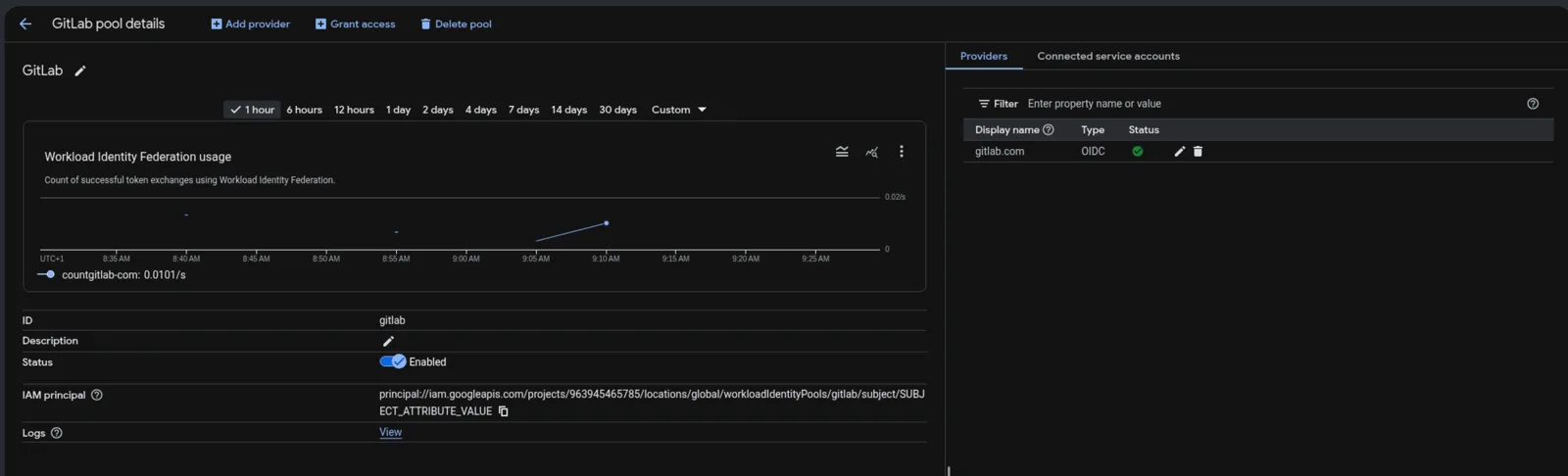
The pool, the provider and the service accounts come from the terraform-google-gitlab-wif module in the group module registry (the previous post covers the registry). The provider configuration matters most:
resource "google_iam_workload_identity_pool_provider" "this" {
  project                            = var.project_id
  workload_identity_pool_id          = google_iam_workload_identity_pool.this.workload_identity_pool_id
  workload_identity_pool_provider_id = "gitlab-com"

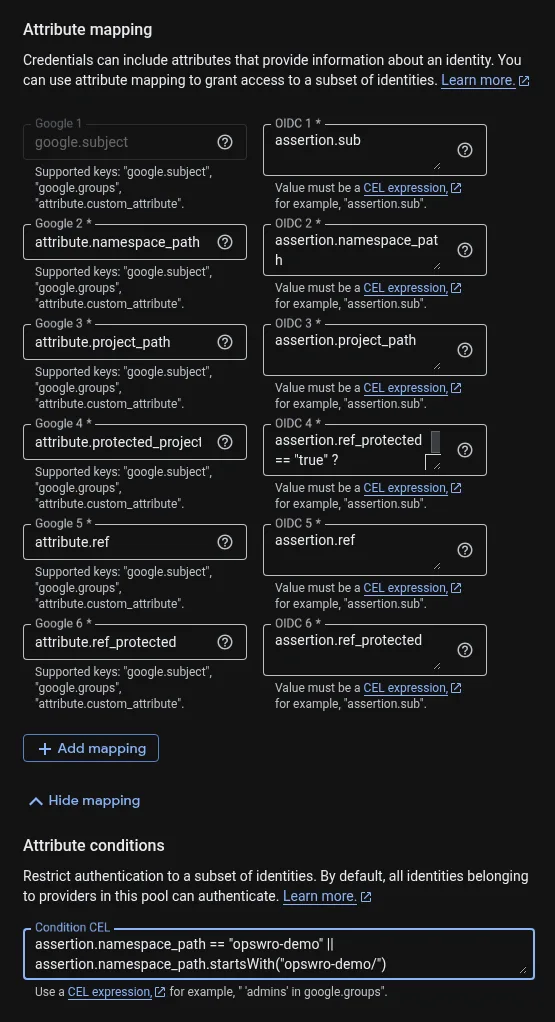
  attribute_mapping = {
    "google.subject"           = "assertion.sub"
    "attribute.namespace_path" = "assertion.namespace_path"
    "attribute.project_path"   = "assertion.project_path"
    "attribute.ref"            = "assertion.ref"
    "attribute.ref_protected"  = "assertion.ref_protected"
    "attribute.protected_project_path" = "assertion.ref_protected == \"true\" ? assertion.project_path : \"unprotected\""
  }

  attribute_condition = "assertion.namespace_path == \"opswro-demo\" || assertion.namespace_path.startsWith(\"opswro-demo/\")"

  oidc {
    issuer_uri = "https://gitlab.com"
  }
}
attribute_condition admits only tokens from projects in the opswro-demo group. Without it, a job token from any project on gitlab.com would pass the provider, and only the binding on the service account would stand between it and access.
The subgroup pitfall. namespace_path in the token is the project’s direct parent. For opswro-demo/platform/infra it is opswro-demo/platform, not opswro-demo. The condition assertion.namespace_path == "opswro-demo" therefore rejects every project in a subgroup. Hence the second part with startsWith, with a trailing slash so that a group whose name merely starts with opswro-demo stays out.
Two accounts: plan from MRs, apply only from main
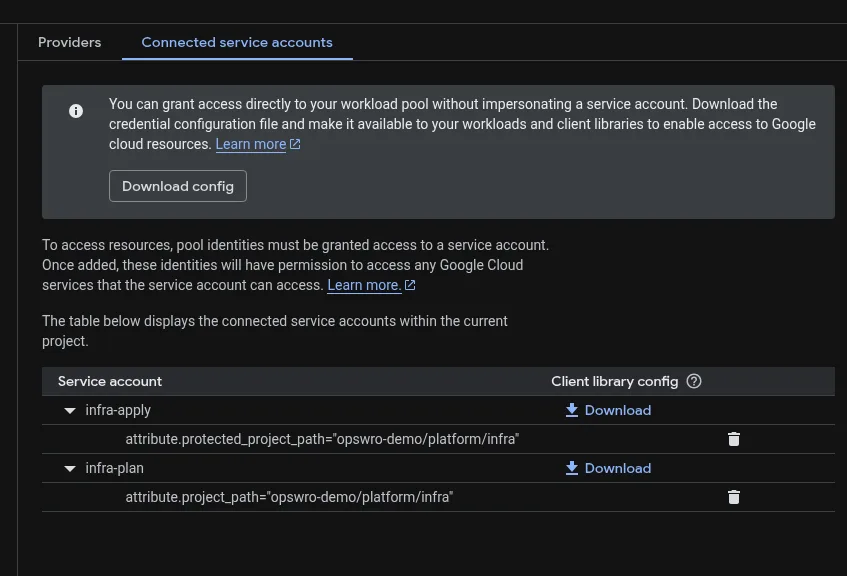
A plan in a merge request needs read access only. Apply changes the network and the cluster, so it should run only from the protected main branch, which takes no code without a merge request. In the lab bootstrap these are two entries in the module:
service_accounts = {
  infra-plan = {
    project_path   = "opswro-demo/platform/infra"
    protected_only = false
    roles          = ["roles/viewer", "roles/iam.securityReviewer"]
  }
  infra-apply = {
    project_path   = "opswro-demo/platform/infra"
    protected_only = true
    roles          = ["roles/viewer", "roles/compute.networkAdmin", "roles/container.admin"]
  }
}
The module grants each account roles/iam.workloadIdentityUser for a set of identities from the pool. The plan account admits every job of the infra project, the apply account only jobs from protected branches:
member = format(
  "principalSet://iam.googleapis.com/%s/attribute.%s/%s",
  google_iam_workload_identity_pool.this.name,
  each.value.protected_only ? "protected_project_path" : "project_path",
  each.value.project_path,
)
Why a separate protected_project_path attribute. A principalSet matches one attribute against one value. It cannot express “project infra and a protected branch”. The CEL expression in the mapping folds both conditions into one attribute: for a protected branch it holds the project path, for any other branch unprotected. The binding on attribute.protected_project_path/opswro-demo/platform/infra therefore admits only protected branches of that project.
The apply account has no permissions on project IAM. The GKE node account is created by the bootstrap, and apply gets only roles/iam.serviceAccountUser on that one account. The pipeline can attach the node account to the cluster, but it cannot grant new roles to itself or anyone else.
The GitLab side: id_tokens and the login script
The infra pipeline uses the OpenTofu component. With enable_id_tokens: true every component job inherits id_tokens from the hidden job .gitlab-tofu:id_tokens and sources .gitlab/ci/setup-id-tokens.sh before calling tofu:
.gitlab-tofu:id_tokens:
  id_tokens:
    GCP_ID_TOKEN:
      aud: $GCP_WIF_AUDIENCE
The script picks the account based on whether the branch is protected and writes an external_account configuration file. Google libraries, including the OpenTofu provider, do the token exchange with it on their own:
if [ "${CI_COMMIT_REF_PROTECTED:-false}" = "true" ]; then
  GCP_SA="$GCP_SA_APPLY"
else
  GCP_SA="$GCP_SA_PLAN"
fi

GCP_TOKEN_FILE="$(mktemp)"
GCP_CREDS_FILE="$(mktemp)"
printf '%s' "$GCP_ID_TOKEN" > "$GCP_TOKEN_FILE"

cat > "$GCP_CREDS_FILE" <<EOF
{
  "type": "external_account",
  "audience": "//iam.googleapis.com/${GCP_WIF_PROVIDER}",
  "subject_token_type": "urn:ietf:params:oauth:token-type:jwt",
  "token_url": "https://sts.googleapis.com/v1/token",
  "credential_source": { "file": "${GCP_TOKEN_FILE}" },
  "service_account_impersonation_url": "https://iamcredentials.googleapis.com/v1/projects/-/serviceAccounts/${GCP_SA}:generateAccessToken"
}
EOF

export GOOGLE_APPLICATION_CREDENTIALS="$GCP_CREDS_FILE"
echo "GCP: impersonating ${GCP_SA}"
Two spellings of the same address. In the job token’s aud the provider is written as https://iam.googleapis.com/projects/…, in the audience field of the external_account file as //iam.googleapis.com/projects/…. That is how the provider’s default allowed audience works. Mixing them up makes STS reject the token.
The project CI/CD variables hold four values: GCP_WIF_PROVIDER, GCP_WIF_AUDIENCE, GCP_SA_PLAN and GCP_SA_APPLY. None of them is a secret. They are resource names printed by the bootstrap’s tofu output. We leave “Protect variable” unchecked, because the plan in a merge request needs them too. Protection comes from the condition on the Google side, not from hiding the variable.
The job log shows which account it got. In a merge request GCP: impersonating [email protected], on main infra-apply@….
Test: an unprotected branch does not get the apply account
The account is picked by a script in the repository, and any Developer can change that script on their own branch. They cannot override the variable when running a pipeline by hand, because new projects on gitlab.com have pipeline variables turned off (Settings → CI/CD → Variables → Minimum role to use pipeline variables), but a code change is enough. So we tested the simplest attack: on the test/odmowa-wif branch the script always asks for the apply account.
# TEST: an unprotected branch asks for the apply account. Google must refuse.
GCP_SA="$GCP_SA_APPLY"
The plan job result:
GCP: impersonating [email protected]
...
Error: Error when reading or editing ComputeNetwork "projects/opswro-lab/global/networks/lab":
oauth2/google: status code 403: {
  "error": {
    "code": 403,
    "message": "Permission 'iam.serviceAccounts.getAccessToken' denied on resource (or it may not exist). ...",
    "status": "PERMISSION_DENIED",
    "details": [{ "reason": "IAM_PERMISSION_DENIED", "metadata": { "permission": "iam.serviceAccounts.getAccessToken" } }]
  }
}
STS accepted the token, because the project belongs to the group. The refusal came from generateAccessToken: an identity from an unprotected branch has protected_project_path set to unprotected, so it does not match the binding on the apply account.
What Google Cloud logs show
Without any configuration Google writes a GenerateAccessToken audit entry: which account got a token, from which IP address and for how long (3600s). It does not show which GitLab job asked for the token. For that you need Data Access logs, and Google’s documentation names two services and the “Admin Read” type:
resource "google_project_iam_audit_config" "sts" {
  project = var.project_id
  service = "sts.googleapis.com"

  audit_log_config {
    log_type = "ADMIN_READ"
  }
  audit_log_config {
    log_type = "DATA_READ"
  }
}

resource "google_project_iam_audit_config" "iam" {
  project = var.project_id
  service = "iam.googleapis.com"

  audit_log_config {
    log_type = "ADMIN_READ"
  }
  audit_log_config {
    log_type = "DATA_READ"
  }
}
Two things cost us time here. DATA_READ alone on STS produces no token exchange entries at all. And a configuration for iamcredentials.googleapis.com fails with Service iamcredentials.googleapis.com does not exist or does not support service level configuration of Google Cloud audit logging, because that service’s logs are turned on through iam.googleapis.com.
Once enabled, every job leaves two entries. The first is ExchangeToken in STS, with the sub of the GitLab token (excerpt):
{
  "methodName": "google.identity.sts.v1.SecurityTokenService.ExchangeToken",
  "authenticationInfo": {
    "principalSubject": "project_path:opswro-demo/platform/infra:ref_type:branch:ref:test/odmowa-wif"
  },
  "resourceName": "projects/963945465785/locations/global/workloadIdentityPools/gitlab/providers/gitlab-com"
}
The second is GenerateAccessToken. For the test from the previous section it shows which branch asked for which account and that it was refused:
{
  "methodName": "GenerateAccessToken",
  "authenticationInfo": {
    "principalSubject": "principal://iam.googleapis.com/projects/963945465785/locations/global/workloadIdentityPools/gitlab/subject/project_path:opswro-demo/platform/infra:ref_type:branch:ref:test/odmowa-wif"
  },
  "authorizationInfo": [{ "granted": false, "permission": "iam.serviceAccounts.getAccessToken" }],
  "metadata": {
    "identityDelegationChain": ["projects/-/serviceAccounts/[email protected]"]
  },
  "status": { "code": 7, "message": "Permission 'iam.serviceAccounts.getAccessToken' denied on resource (or it may not exist)." }
}
The same entry for ref:main has "granted": true. In Logs Explorer the query protoPayload.serviceName=("sts.googleapis.com" OR "iamcredentials.googleapis.com") lists every exchange in the lab. The ExchangeToken entry always shows sts.identityProviders.checkLogging with "granted": false. That check is about logging itself and does not block the exchange.
What is still done by hand
The pool, the provider and the service accounts are created once, from a laptop, by a person with admin rights on the GCP project. The OpenTofu provider then takes credentials from Application Default Credentials, not from gcloud auth login. When the Google Workspace organization requires reauthentication, apply fails with invalid_grant and reauth related error (invalid_rapt). gcloud auth application-default login fixes it, gcloud auth login alone does not.
The next post builds on this: a GKE cluster and a GitLab runner on Kubernetes, with resource limits and the cost of one lab day.
Still keeping JSON keys for Google Cloud or AWS in GitLab CI and want them gone? See how we set up CI/CD. We are a partner of GitLab and Google Cloud.